![AIM Logo Final White RGB@2x.png]](https://3437204.hs-sites.com/hs-fs/hubfs/AIM%20Logo%20Final%20White%20RGB@2x.png?height=50&name=AIM%20Logo%20Final%20White%20RGB@2x.png)
Please use discretion when utilizing the Add With Carry feature. This function is meant for repetitive patient transports where the billing data entry for subsequent bills either exactly or very closely mirrors the data entry of future bills.
In many cases, creating a new bill manually and carrying individual parts of the data entry (payers, diagnosis codes, etc) may be more efficient. Please contact AIM Support for more information on what to use in specific circumstances.
When viewing a bill for an existing patient, the 'Add With Carry' function activates under the More Options icon:
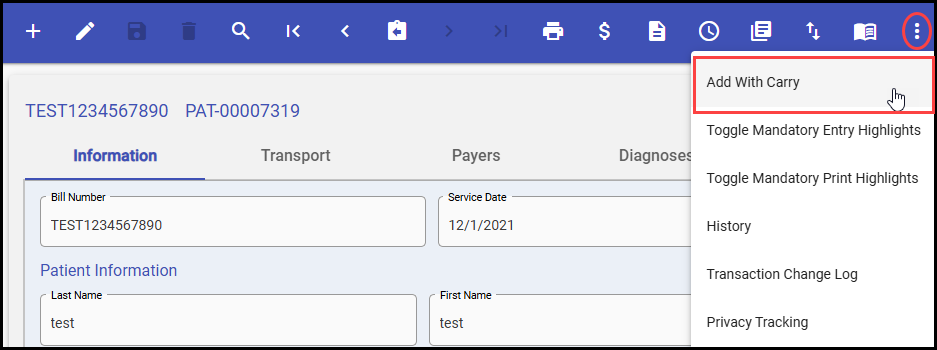
Once selected, a new bill will be created, utilizing all available data from the current bill. This includes the main data entry sections such as:
- Information Tab
- Service Date
- Subscriber Status
- Patient Name
- Patient Address
- Patient SSN
- Patient Date of Birth
- Patient Gender
- Patient Phone Number
- Relationship to Insured
- Insured Name
- Insured Address
- Insured SSN
- Insured Date of Birth
- Insured Gender
- Insured Phone Number
- Transport Tab
- Picked Up Location
- Taken To Location
- Payers Tab
- Payers
Using the Add With Carry feature will copy-over all data entry for the insurance payers from the bill that Add With Carry is used on. Some data may require changes for the new bill in some circumstances - please use discretion.
Example: Signature Provided On
- Diagnoses Tab
- Diagnosis Codes
- Charges Tab
- Base Rate
- Mileage Rate
- Other Rates