![AIM Logo Final White RGB@2x.png]](https://3437204.hs-sites.com/hs-fs/hubfs/AIM%20Logo%20Final%20White%20RGB@2x.png?height=50&name=AIM%20Logo%20Final%20White%20RGB@2x.png)
Patient Lookup: Selecting New or Existing
Overview
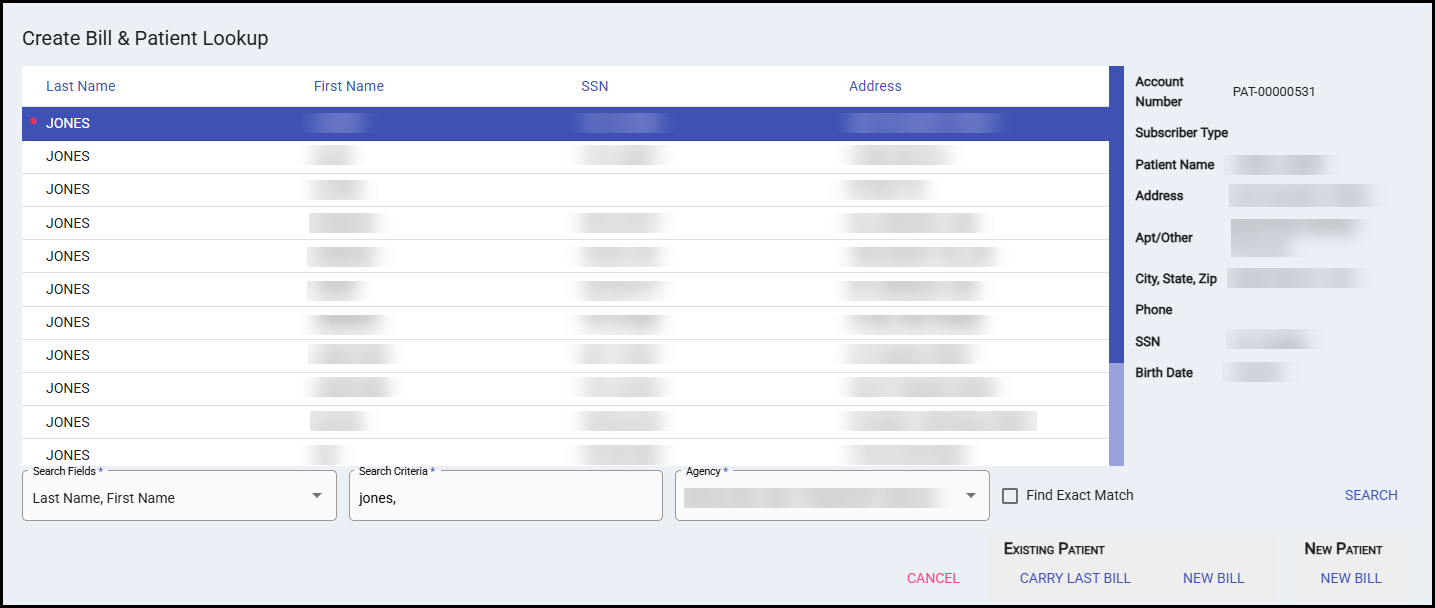
When creating a new bill, you can either select one of the options to create a bill with an existing patient account or create a new account for a new patient's first bill all at once. This guide walks you through both options.
Searching for Existing Patients
How to Search
- Enter patient information in the Search Criteria field.
- Additional search options can be selected in the Search Fields dropdown.
- The system will display results matching your search criteria
- You can search using partial information (a few characters) to get broader results
Search Tips
- Use just the first few letters of a last name for wider results or the full name in "Last Name, First Name" format to get specific results.
- The search looks through all established patient accounts
- Results will show patients similar to what you've entered
Patient Found: Existing Patient Options
When you locate an existing patient account, you have two options:
New Bill
- Purpose: Creates a fresh bill for this patient
- What it does: Links the new bill to the existing account number and pulls in basic demographic information
- Best for: Standard new visits or services
Carry Last Trip
- Purpose: Creates a new bill using information from the patient's most recent visit
- What it does: Links the new bill to the existing account and automatically populates configured fields with data from the last trip. See Field Configuration Setup to see which fields automatically carry and for which payer types.
- Best for: Frequent patients where most information remains the same between visits
- Important: You must review all auto-populated data before proceeding, as patient information may have changed
Patient Not Found: New Patient Option
New Bill
- Purpose: Creates a completely new patient account using the information for that patient's first bill
- What it does: Establishes a new account number based on the information you enter for this bill
- Best for: First-time patients or when no existing account can be located
Quick Decision Guide
Choose "New Bill" when:
- You want fresh data entry
- Patient information may have changed significantly
Choose "Carry Last Trip" when:
- Patient exists in system
- Patient visits frequently
- Most information likely remains the same
- You want to save time on data entry
Choose "New Patient" when:
- No existing account found
- Confirmed new patient and a new account must be established
When carrying last trip, patient insurance payers may also automatically carry from last trip.
When adding a newly-imported bill, sometimes crew-collected insurance may be presented for use.