![AIM Logo Final White RGB@2x.png]](https://3437204.hs-sites.com/hs-fs/hubfs/AIM%20Logo%20Final%20White%20RGB@2x.png?height=50&name=AIM%20Logo%20Final%20White%20RGB@2x.png)
AutoFax is a particularly useful feature for any facilities that need a copy of the patient care report. Through use of AutoFax, facilities can get a copy of the Hard Copy automatically once the PCR is completed either via Fax or E-mail.
AutoFax must first be enabled through AIM Support before it can be used. Please contact AIM Support to learn more about the costs potentially associated with the AutoFax feature's fax option.
Basic Workflow Overview
- Complete PCR or use Manual Fax button on Action Toolbar

- Once PCR is completed, either the user will be prompted (see below setting in Patient Care Setup's Configuration Switches Setup "Auto Fax Requires User Confirmation") or the Hard Copy will be sent automatically depending on the configuration
- Hard Copy will be sent using either Fax or E-mail depending on the settings for the selected Taken To Location in General Setup's Facilities Setup
- Updated Hard Copies will either send automatically or prompt the user to send an updated Hard Copy when the PCR is subsequently unfinished and edited again.
Configuration
To enable AutoFax, it first must be configured by AIM Support and the settings reviewed by the agency. There are settings located in both Patient Care Setup's Configuration Switches Setup as well as General Setup's Facilities Setup that must be reviewed prior to using AutoFax.
To use AutoFax, each participating facility must contain an AutoFax Phone and/or an AutoFax E-mail in Facilities Setup:

This section appears at the bottom of each Facilities Setup record. It is important to keep in mind the costs associated with using the Fax Method - the E-mail option is free and should be used if possible to avoid incurring fees. The E-mail option can also be password protected.
- Select a Fax Method (Fax or E-mail, depending on the facility).
- Enter a Fax Phone and/or Fax E-mail.
- If Fax E-mail is selected, it is recommended to configure a secure password and share that with the facility to protect the PHI data and remain HIPAA compliant.
- When the AutoFax feature kicks in, the system uses the Method selected for that Facility and uses the Phone or E-mail associated with that Facility when faxing/e-mailing this information.
There are additional settings in Patient Care Setup's Configuration Switches Setup that should be reviewed:
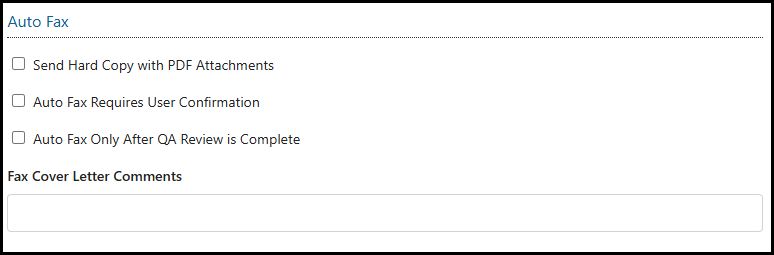
- Send Hard Copy with PDF Attachments: If enabled, instead of sending the regular Hard Copy, the Hard Copy with Attachments will be sent instead.
- Auto Fax Requires User Confirmation: If enabled, the user is prompted as to if they would like to send the PCR Hard Copy instead of it going automatically. Recommended for customers utilizing AIM's QA process to prevent additional submissions of the Hard Copy report when not needed.
- Auto Fax Only After QA Review is Complete: If enabled, instead of sending the Hard Copy when the record is completed, it will only send once the QA review has been completed in order to ensure the information contained within that Hard Copy is accurate. Recommended for customers utilizing AIM's QA process.
- Fax Cover Letter Comments: Allows for configuration of comments for the Fax Cover Letter that sends along with the Fax Method. Recommended when using the Fax Method and not the E-mail Method.