![AIM Logo Final White RGB@2x.png]](https://3437204.hs-sites.com/hs-fs/hubfs/AIM%20Logo%20Final%20White%20RGB@2x.png?height=50&name=AIM%20Logo%20Final%20White%20RGB@2x.png)
For a detailed breakdown of each bill in the Collections process, users can utilize the Bills in Collections (Detailed) Report.
For an overview, users can alternatively use the Bills in Collections (Summary) Report, which provides less information per bill in an efficient list-format.
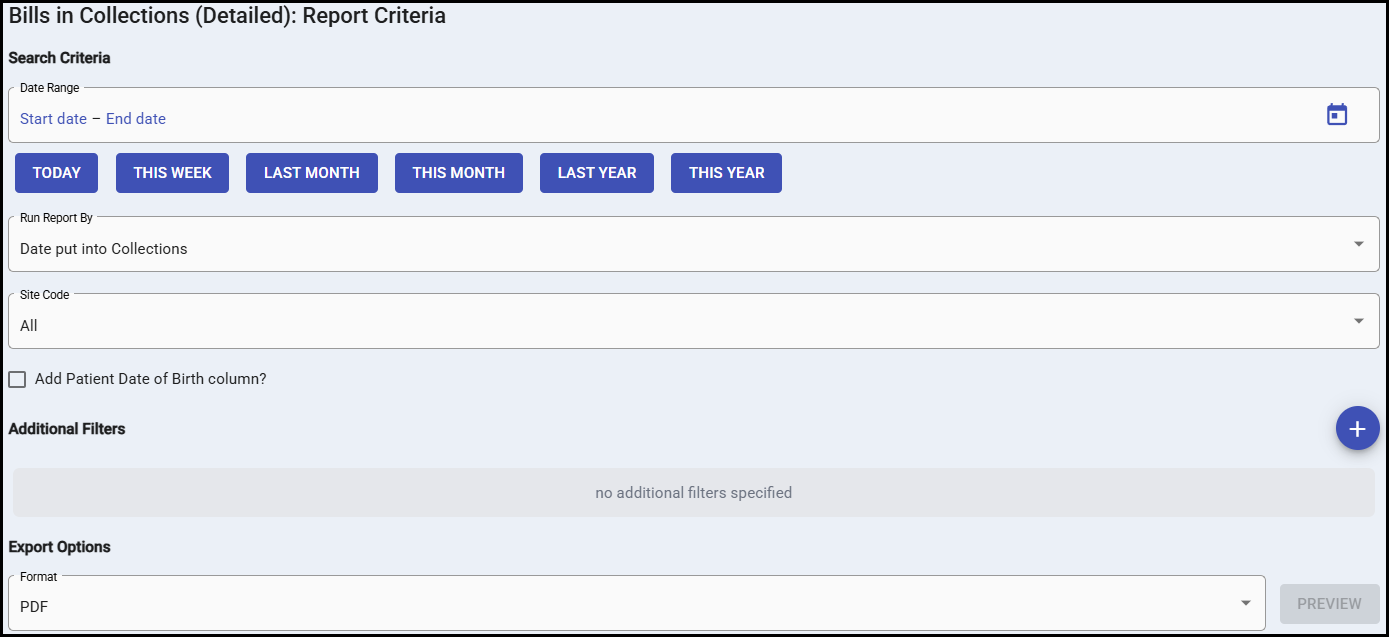
This report prompts for a date range than can be ran in one of two ways, using the Run Report By dropdown:
- Date of Service: runs the report over a date of service range
- Date put into Collections: runs the report over a transaction date range, identifying bills that entered the collections process within that timeframe using the SL (Sent to Collections) transaction.
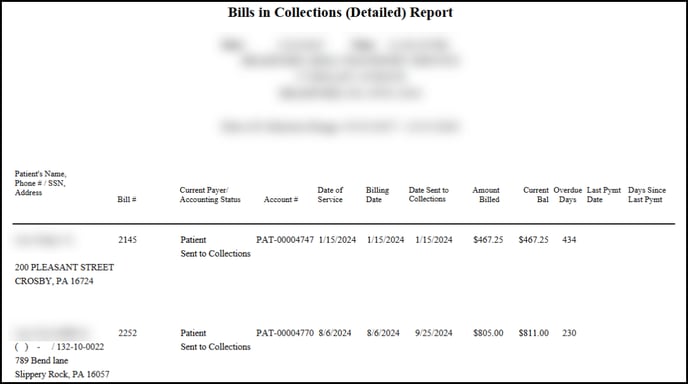
The output of the report provides many details for each bill. The first column contains the Patient Name, Phone Number, SSN and Address Information, followed by the Patient Date of Birth, if configured to display. The next columns provide the Bill Number, the Current Payer and its Accounting Status, the Patient Account Number, Date of Service, Billing Date (the date the bill was first sent), Date Sent to Collections, Amount Billed, Current Balance, Number of Days Overdue, the Last Payment Date, and the Number of Days Since Last Payment.