![AIM Logo Final White RGB@2x.png]](https://3437204.hs-sites.com/hs-fs/hubfs/AIM%20Logo%20Final%20White%20RGB@2x.png?height=50&name=AIM%20Logo%20Final%20White%20RGB@2x.png)
To submit claims electronically, payer types must be configured with the correct information.
All electronic payer transmissions are very important. If there are any questions, errors, rejections or issues with electronic claims, please call Customer Support at 1-800-726-4362.
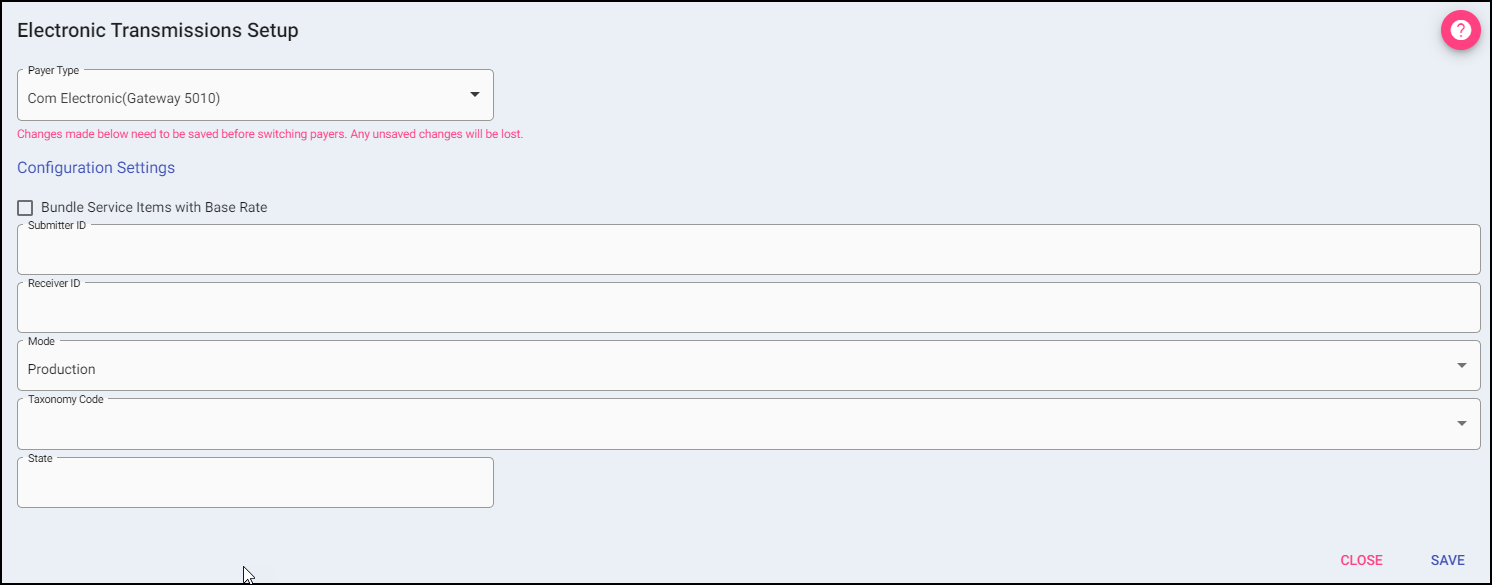
If these fields are not entered or data is invalid, claims may not transmit as expected.
Changes made will need to be saved before switching payer type. Any unsaved changes will be lost.
Payer Type: Select the appropriate Payer type from the drop-down list.
Bundle Service Items with Base Rate: Checking the box will bundle service items with base rate.
Submitter ID: Enter the Submitter ID assigned to the payer.
Receiver ID: Enter the Receiver ID assigned to the payer.
Mode: This field controls the Billing Module Mode (Test or Production).
- Production: Formats as live claims to be processed and paid by the payer.
- Test: Formats the claims so they are checked, but not processed by the Payer.
Taxonomy Code: Select the taxonomy code for the ambulance service from the drop-down list.
State: Enter your state using the abbreviation.

Payer Address: If available, the electronic payer address can be entered here. Not a required entry.
Auto Round Mileage: automatically rounds fractional mileage to whole numbers using standard rounding rules, with a user prompt for confirmation when fractional values are detected.