![AIM Logo Final White RGB@2x.png]](https://3437204.hs-sites.com/hs-fs/hubfs/AIM%20Logo%20Final%20White%20RGB@2x.png?height=50&name=AIM%20Logo%20Final%20White%20RGB@2x.png)
NOTICE: Release will take place from 7AM- 7:15AM, the application will not be accessible during the update.
It is recommended after each release; users clear their browser cache. This can be done by using the F12 key on your keyboard, right-clicking on the browser refresh button and selecting "Empty Cache and Hard Reload".
This document explains functionality updates to the AIM Online V6 Billing application. For additional information, please contact Customer Support at 1-800-726-4362 or support@aim-system.com.
Setup Updates
- Enforce Eligibility option added via multiple Setup sections:
Company defined Enforce Eligibility setup options have been added to ensure billers are always checking eligibility for a specific payer or within a set timeframe.- “Enforce Last Verified At Date” option added to General Setup, Commercial Payers. Available for each individual payer, if enabled, eligibility check will be enforced for the specific commercial payer, when “Mandatory” is enabled for Commercial Payers in Billing, Field Configuration.
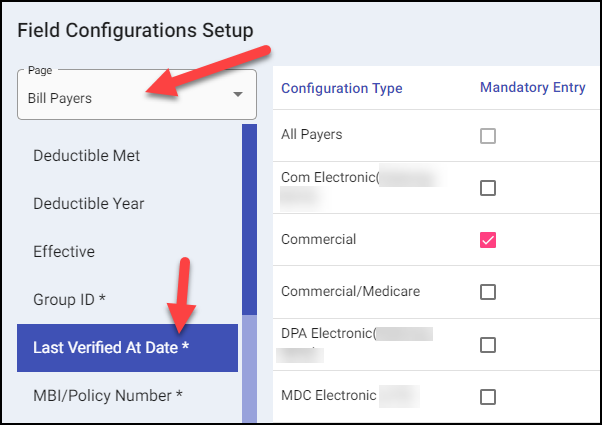
- “Last Verified At Date” option added to Billing, Field Configuration Setup, Bill Payers page. If enabled for Commercial, eligibility checks will be enforced for specific Commercial Payer. If Mandatory is enabled, an eligibility check must be attempted before a bill can be saved if it has not yet been printed/transmitted.
- “Last Verified At Number of Days” option added to Billing, Configuration Settings. This will indicate the number of days allowed since the last eligibility check.
- “Enforce Last Verified At Date” option added to General Setup, Commercial Payers. Available for each individual payer, if enabled, eligibility check will be enforced for the specific commercial payer, when “Mandatory” is enabled for Commercial Payers in Billing, Field Configuration.


Account/Subscriptions Updates
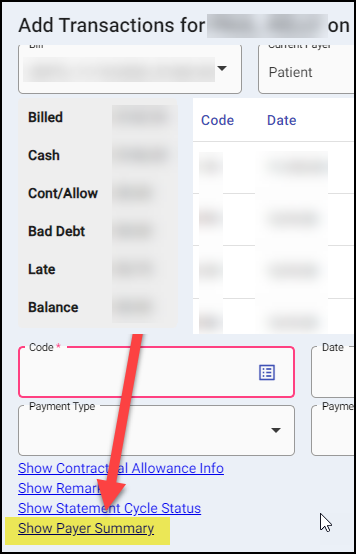
- Payer Summary link added to Add Transactions window. Displays how many times a bill payer has been Transmitted/Printed and Rejected.
- Suffix column added to results when searching by Last Name/First Name.
Billing Updates
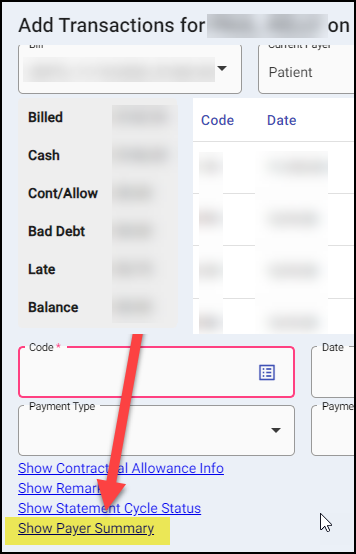
- Payer Summary link added to the Add Transactions window. Displays how many times a bill payer has been Transmitted/Printed and Rejected.
- “Update Patient Information” button added to Insured Information section. When selected, it will update the Patient Information section to match the Insured Information section.
- “Add” button updated to return user to the Information tab when starting a new bill.
- Arrow icons updated to move through bill numbers based off the criteria used in the search (i.e., Name Date of Service, etc.).
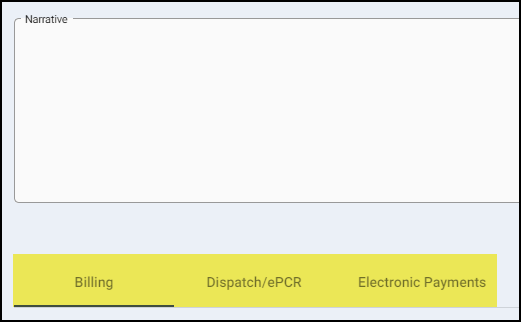
- Narrative tab split into three separate sections: Billing (any information entered by a user), Dispatch/ePCR (any narrative information imported from Dispatch/ePCR program) and Electronic Payments (any postings done via the Process Reconciliation feature). This new feature will only be available for new bills, existing bills information will all be listed under the Billing section.
- Suffix column added to results when searching by Last Name/First Name.

Improvements
- Eligibility feature updated to correctly distinguish between Active and Inactive payers and display correctly on the Bill Payers tab.
- Dues History on the Subscription tab in the Accounts Module updated to default initials of user creating account.
- Add Transactions updated to allow postings of a transaction date prior to the Date of Service.
- Spaces before or after Modifiers on the Charges tab will be removed in the transmission file automatically to avoid errors.