![AIM Logo Final White RGB@2x.png]](https://3437204.hs-sites.com/hs-fs/hubfs/AIM%20Logo%20Final%20White%20RGB@2x.png?height=50&name=AIM%20Logo%20Final%20White%20RGB@2x.png)
Router Box
Displayed on the left side of the screen under the Module options. This is a list of bills to the user based off entries in the Router tab of a bill.
Any routed bills appear on or after the Scheduled Date.
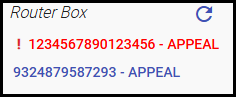
- Routes marked Urgent are indicated in red with the exclamation mark icon.
- Standard routes appear in blue.
- Changing to the Accounts/Subscription module will save the scroll bar position in the Router Box so that when users return to the billing module they can resume immediately where they left off.
Selecting the Bill number opens the selected bill.
Refresh clears or resets the list if changes are made.