![AIM Logo Final White RGB@2x.png]](https://3437204.hs-sites.com/hs-fs/hubfs/AIM%20Logo%20Final%20White%20RGB@2x.png?height=50&name=AIM%20Logo%20Final%20White%20RGB@2x.png)
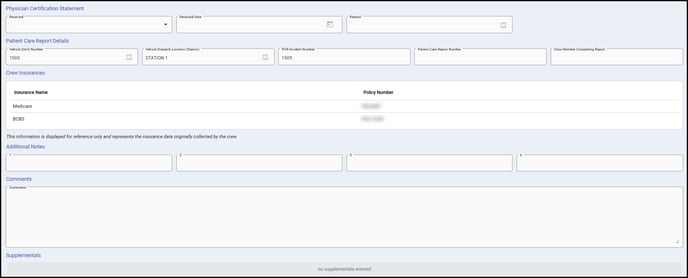
Physician Certification Statement Section
Physician Certification Statement (PCS) Information organizes data regarding Medical Necessity and to show that “Reasonable and Necessary” requirements are met, especially with Non-Emergency Transports.
- The Requirement Field provides for None, Before, and/or After.
- The Date Received Field is a standard calendar field that shows when the PCS was signed.
- The Reason Obtained Field is a quick-pick whose entries must be set up according to need.
Patient Care Report Details Section
This section provides details from imported ePCRs or from ePCRs posted from AIM ePCR.
- Vehicle (Unit) Number contains the Vehicle Number from the ePCR.
- Similarly, Vehicle Dispatch Location (Station) shows where this transport was dispatched from.
- PCR Incident Number and Patient Care Report Number show both of these trip numbers in their respective fields.
- Crew Member Completing Report shows the author of the associated patient care report if imported or posted from AIM ePCR - if the bill was manually entered, this will be blank. Typically this will only display the ID (EMS License Number) of the crew member unless their ID is mapped to a Name in Crew Setup.
Crew Insurances
This grid shows any Insurance Names and Policy Numbers collected on the patient care report or dispatch call for this transport. It is available for reference by the biller and does not have to be used.

Insurance data can be added to this grid automatically in two ways:
- When posting from AIM Dispatch / ePCR
- When bills are imported from a third party ePCR system
Records must contain at least an Insurance Name and Policy Number to import to the Crew Insurances grid.
Notes & Comments
Additional Notes can be entered in the fields below. These notes don't print anywhere. Feel free to leave notes there, or the Comments textbox right below, which also does not print anywhere.
Supplemental Prompts
The Supplemental Section stores user-definable customized questions. Please see Supplemental Setup for more information on creating these prompts. These prompts can collect various data types and be used to enter optional or company-specific information that would not be sent on the bill, but would be used for reference purposes.