![AIM Logo Final White RGB@2x.png]](https://3437204.hs-sites.com/hs-fs/hubfs/AIM%20Logo%20Final%20White%20RGB@2x.png?height=50&name=AIM%20Logo%20Final%20White%20RGB@2x.png)
A statement is a reminder sent to a patient after the initial bill was sent. It explains unpaid balances that exist on any Bill Number associated with a specific account.
A statement can only be created after a bill (Patient Blank, Patient Invoice, and possibly other forms) is sent to a payer (usually the patient, but this can be set to include other payers). Statements are generated when criteria and cycles in the Statements & Aging Setup are met. The most important aspect is the number of days the open balance exists.
Statements can be either blank or invoice, as consistent with other patient forms in the program. The image below is the invoice format, which readily shows the data expected on a statement.
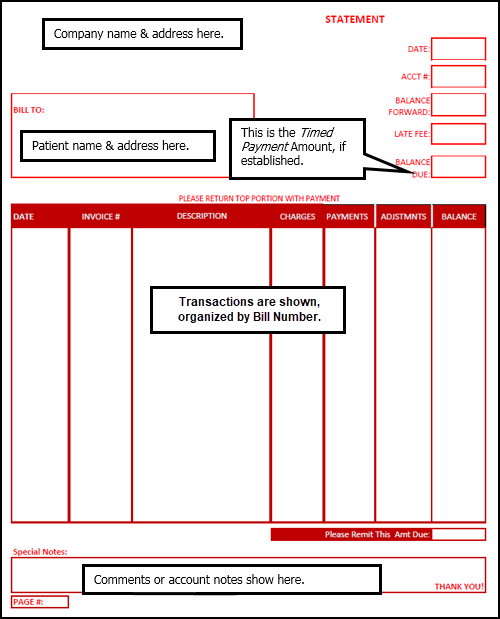
In the Blank Paper Statement, the headers/labels are printed with the data.
There is a difference between a bill/invoice and a statement. A bill or invoice is for one Bill Number and one date of service; a statement shows all Bill Numbers for the patient account. Statements show some transactions, but not all charges and details, as a bill or invoice would.
Processing statements is a function in the program that touches every account, and posts a transaction to every account that generates.
Statement Processes and Expectations
Assuming that the payer involved is marked in the Statements & Aging:
- A bill is sent to the payer.
- Statements are generated on a consistent basis for all cycles.
- The Method of Deriving Cycles is either Date Billed or Date of Service. When the number of days meets the Method of Deriving Cycles, a statement can print.
- The statement is generated when the appropriate cycle is processed.
- When the next cycle is met, another statement can print.
- Statements are expected to generate until the last cycle is met, the Bill Number(s) are placed in Collections, or until the balance is closed (or ongoing with the Timed Payments Feature).
When to Run Statements
Run statements regularly. How regularly depends upon the numbers of statements expected and how that impacts the daily work flow. Regardless, statements should be processed no less frequently than every week, and can even be processed daily to ensure that there are no gaps or situations where a patient receives inappropriate statements.
Remember that statements can only generate if the criteria of the Bill Number/Account hits a cycle. Because statements must be processed by a user in the program, the timing of the statements is more dependent on when it is processed, and not so much on the cycles.
Often, users operate under the common misunderstanding that these statements generate once a month, or that all statements generate on a certain day. It is most likely that some statements are ready every day. This is because a statement can be generated, and would be processed, as long as it meets the Method of Deriving Cycles Option and the days of the cycle.
A statement can be generated on the day it meets that timing, or any day after it, depending on when a user processes that cycle. If a cycle is not processed for a week, 10 days, or three weeks, no statements can generate during that time.
Several problems can occur with inconsistent processing of statements:
- A statement is delayed by weeks.
- A statement is sent, and another statement generates in a few days, so the patient receives two statements in a very short amount of time.
- Timed Payments are very inconsistent.
- The messages on the statements, warning letter, and the Collections Report, and the timing of when a patient is sent to Collections are not as expected.
Functionality Related to Statements
Other program functionality is related to statements, but these processes are separate from the statements. None of these processes below affect the normal processing of statements. These items are explained in detail in other sections.
This allows a statement to be printed and does not affect the Cycles.
A warning letter replaces the last cycle established. It is meant to be the final message to the patient, before the balance owed is given to a Collection Agency. The warning letter is an established message in the Statements & Aging Setup added to the data of a statement.
This report provides all the information a Collections Agency needs to pursue the balance owed. The Collections Report’s functionality includes posting a transaction to place the Bill Numbers/account in the Collections Status, removing the balance from most processes.
The Collections Report is based on specific criteria (either Date of Service or Date Billed), but this setup is in the Collections Report Setup, and has no interaction with Statements.
Legal Awareness
While available as functionality to users of The AIM System, Statements & Aging, warning letters, Timed Payments, and especially Collection Reporting are likely governed by specific local, state, and federal laws.
Any charges or fees based on services or timely payment of balances due should not be implied by the ability of the program to perform these functions. In most situations, the patient must be made aware of potential charges. It is the responsibility and obligation of the Company to be aware of regulations covering fees, charges, and actions/messages in relation to third party Collections.
Printing patient statements can:
- download your statements locally for you to print manually (default functionality as described above)
OR
To learn more about optimizing your patient billing workflows with the automatic upload options, please contact AIM Support for more information.