![AIM Logo Final White RGB@2x.png]](https://3437204.hs-sites.com/hs-fs/hubfs/AIM%20Logo%20Final%20White%20RGB@2x.png?height=50&name=AIM%20Logo%20Final%20White%20RGB@2x.png)
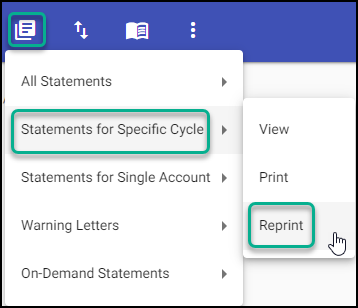
In the Billing Module, click the Print Statements Icon.

From the menu, select Statements for Specific Cycle, Reprint.
Complete field selections.
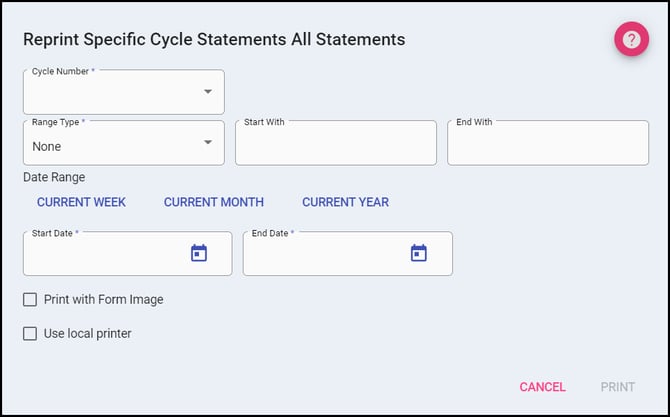
- Cycle Number drop-down list available cycles (defined in the Statements & Aging Setup).
- Range Type options (select None, unless there is a specific mailing need for limiting the statements):
- None: no additional criteria needed, reprint all statements that were ready will be printed.
- Bill Number: reprint statements for Bill Numbers defined by the start and end fields.
- Account Number: reprint statements for Account Numbers defined by the start and end fields.
- Zip Code: reprint statements for Zip Codes defined by the start and end fields.
- Date Range will reprint statements for the specified range entered (Quick selections available, if the process to be reprinted occurred today, use the current date in both fields).
- Print With Form Image allows for statements to print with a pre-designed form (which can be customized in Form Images Setup), without the need for pre-printed forms to be loaded in the printer.
- Use local printer (will only be displayed if applicable): print statements to a local printer (in house printing) using Form Definitions, rather than printing a file for a clearinghouse.
After processing, the system will show how many statements are to be printed (downloading a file if applicable).
A prompt will be displayed to determine if a transaction should be posted.
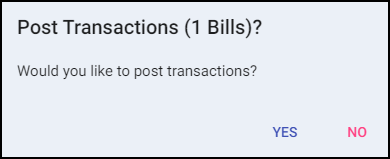
Yes; the transaction then posts to all the accounts (to the earliest Bill Number with an open balance), and other tables are updated.
No; statement processing does not update Account/Bill Numbers, nor are the cycles affected. Statements can be generated at a later time as normal, and the SG transactions are not posted.
Note: If configured to automatically upload your patient statements to a clearinghouse, this will resubmit the statements to the clearinghouse unless "Use local printer" is enabled during the Reprint Statements? dialog. "Use Local Printer" will download the statements locally in the normal format instead of uploading it in the clearinghouse format automatically.