![AIM Logo Final White RGB@2x.png]](https://3437204.hs-sites.com/hs-fs/hubfs/AIM%20Logo%20Final%20White%20RGB@2x.png?height=50&name=AIM%20Logo%20Final%20White%20RGB@2x.png)
The current tab name is bold and underlined, while the other tab names are in a lighter color.
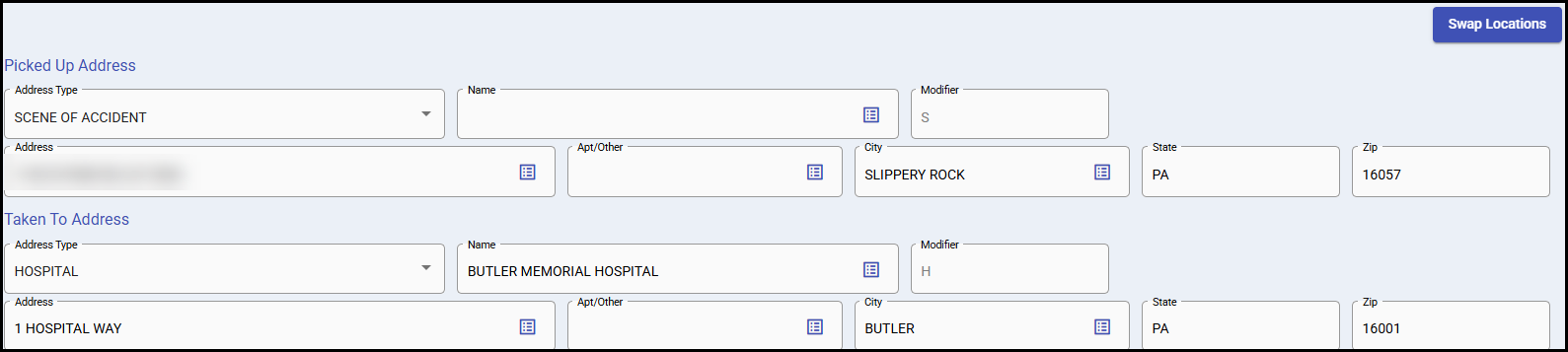
Locations can be defined under General Setup, Picked Up/Taken To Locations.
Data can be typed in, but it is best practice selecting an entry for formatting purposes. If free-formed, important information may be missing, especially on claims that are transmitted (electronically).
Picked Up Address: Location of where the transport started with type, name (if applicable) and full address.
Taken To Address: Location of where the transport ended with type, name (if applicable) and full address.
Address Type options (will also populate the Modifier field beside name, based off selection):
- Clinic is not a recommend option to use.
- Diagnostic/Therapeutic Center is a Diagnostic or therapeutic site.
- Freestanding ESRD Facility must be a freestanding ESRD facility.
- Hospital is the hospital location the patient was picked up or taken to.
- Hospital Based ESRD Facility must be a hospital based ESRD facility.
- Intermediate Stop can be used for Call Cancels, Refusals, and to track all calls. It can also be used for ALS /BLS transfers when the BLS or ALS crew gives responsibility of the patient to a higher level of transport. This can also involve the opposite, when the care moves from ALS to BLS.
- Other is not a recommend option to use.
- Physician Office can be the starting point for emergency runs (if the patient is in an unstable condition and the doctor requests emergency services) or wheelchair van transports.
- Residence populates patient information entered in the Billing Information Tab.
- Residential/Custodial Facility is where a patient resides for care.
- Scene of Accident is used for a specific location of a run, which includes the scene of an emergency/accident/injury, the sudden onset of an acute event, or a place where an emergency requires Ambulance Services.
- If the need for Ambulance Services is at a Doctor’s Office or Freestanding Dialysis Facility, the location may still be accurately entered as the Scene, if an accident, emergency, injury, or acute event occurs.
- Site of Transfer is always a landing zone.
- Skilled Nursing Facility is the SNF the patient is located.
Swap Locations Button
This button is helpful when billing common routine transport types (such as return trips) where the Add With Carry Feature is used.

Using the Swap Locations button will reverse the Picked Up and Taken To Addresses, which saves significant time when billing for those types of transports.
Please note that this is not necessary when importing bills, which often times can be more effective for streamlining billing processes, depending on the agency's transports.
Do not use Clinic or Other for the Picked Up Location. Clinic and Other are likely to be denied by most major payers, and especially Medicare.